
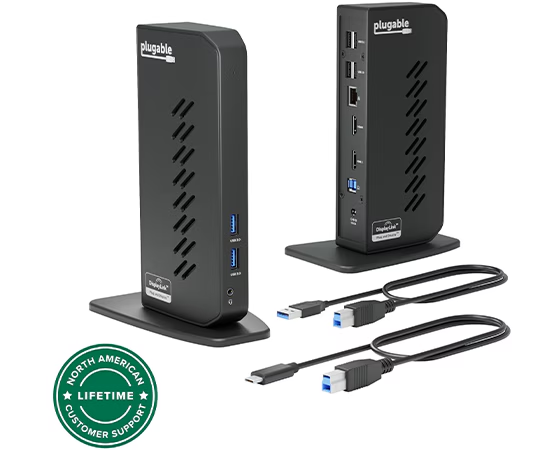
Modern workspaces often require more devices, displays, and accessories than a laptop alone can conveniently handle. Whether you work from home, manage a business, study, create content, or simply want a cleaner computer setup, connecting everything efficiently can become a challenge. A 15-in-1 docking station offers a practical solution by bringing numerous connectivity options into one centralized hub.
Instead of filling your desk with individual adapters, cables, and dongles, a docking station can provide access to multiple ports while helping you create a more organized and productive workspace. For users who rely on multiple displays, choosing a Windows docking station for dual monitors can be particularly useful for expanding screen space and improving multitasking.
What Is a 15-in-1 Docking Station?
A 15-in-1 docking station is a multifunctional connectivity device designed to expand the capabilities of a compatible laptop or computer. Depending on the model, it can include USB ports, HDMI or DisplayPort connections, Ethernet, SD and microSD card readers, audio connections, USB-C ports, and power delivery.
Rather than connecting each peripheral directly to your computer, you can connect many of them to the docking station. A single connection between the dock and laptop can then provide access to those devices.
This arrangement is especially useful for modern laptops that prioritize slim designs and therefore include fewer built-in ports.
Create a More Organized Desk
One of the most noticeable benefits of a docking station is improved desk organization. Without a hub, your workspace can quickly become crowded with USB adapters, display converters, network adapters, card readers, and charging cables.
A 15-in-1 dock consolidates many of these connections into one device. Your keyboard, mouse, monitors, external storage, Ethernet cable, headphones, and other accessories can remain connected to the dock.
When you arrive at your desk, you may only need to connect one primary cable to your laptop. This can make switching between mobile and desktop-style working considerably easier.
Improve Dual-Monitor Productivity
Multiple monitors can make a major difference when your daily work involves comparing information, managing applications, researching topics, editing documents, or communicating with colleagues.
A compatible Windows docking station for dual monitors can allow users to connect two external displays, depending on the computer, operating system, dock specifications, and supported display technology.
For example, you could keep email or communication software on one screen while using the second display for spreadsheets, documents, browser tabs, design software, or research.
Instead of repeatedly minimizing and maximizing windows, you can keep important applications visible simultaneously. This can make a workspace feel much more spacious and efficient.
Expand Your Connectivity Options
A 15-in-1 dock is valuable because it can provide access to a broad selection of ports from a single device. The exact configuration varies between models, but commonly available connections may include USB-A, USB-C, HDMI, DisplayPort, Ethernet, SD card, microSD card, and 3.5mm audio.
This versatility is useful for people who regularly connect different types of equipment.
For example, a photographer may need an SD card reader and external storage, while an office professional might prioritize Ethernet, USB accessories, and multiple monitors. A content creator could benefit from fast storage connections, displays, audio devices, and memory-card access.
The key is to select a docking station whose ports match the equipment you actually use.
Make Laptop Charging Simpler
Many multifunction docking stations also support USB-C Power Delivery. When compatible with your laptop and charger, this feature can allow the dock to transfer power to the computer while simultaneously handling connected peripherals.
This can reduce the number of cables running directly to your laptop.
Instead of connecting a charger, monitor cable, keyboard, mouse, Ethernet cable, and storage device individually, your setup can be routed through the docking station. The result is a cleaner connection system and potentially less cable clutter.
However, users should always check the dock’s maximum power-delivery specification and their laptop’s charging requirements before relying on a dock as the primary charging connection.
Support Faster File Transfers
People who work with large files can also benefit from a well-designed docking station. USB connectivity can make it easier to attach external SSDs, flash drives, cameras, and other storage devices.
For creative professionals, transferring photographs, videos, project files, and other large data sets can become a regular part of the workday. Having storage ports readily accessible on the desk can make these tasks more convenient.
Performance depends on the specific port standard, connected device, cable, and computer. Therefore, it is important to examine the technical specifications instead of assuming that every USB port provides the same speed.
Connect to Wired Networks
Wi-Fi is convenient, but some users prefer Ethernet when they need a stable wired connection. A docking station equipped with an Ethernet port can provide a convenient way to connect a compatible laptop to a wired network without requiring a separate network adapter.
This can be particularly helpful for office environments, large file transfers, video meetings, remote work, and other activities where connection stability matters.
With the network cable permanently connected to the dock, connecting your laptop at your workstation can become a simple plug-and-use process.
Improve Your Home Office Experience
A docking station can turn a laptop-based workspace into something closer to a traditional desktop environment.
You might have two monitors positioned at comfortable viewing angles, a full-size keyboard, ergonomic mouse, Ethernet connection, external speakers, and storage devices all connected to the same central hub.
The laptop can then function primarily as the computer while the dock manages many of the physical connections.
This setup is particularly attractive for people who use the same laptop both around the house and at a dedicated desk. Disconnecting from the workspace can be as simple as unplugging one cable.
Useful for Creative Professionals
Designers, photographers, video editors, developers, and other professionals often work with multiple peripherals simultaneously.
A photographer could connect memory cards and external drives. A designer could use multiple displays and USB accessories. A developer could keep code on one monitor, documentation on another, and use additional peripherals through the dock.
The benefit is not necessarily that a docking station makes software run faster. Instead, it provides the connectivity needed to build a more capable workstation around a laptop.
What to Check Before Buying
Not every 15-in-1 docking station offers identical capabilities. Before purchasing one, check whether it supports your laptop and the devices you intend to connect.
Pay particular attention to display compatibility. If you need two external monitors, verify the supported resolutions, refresh rates, video outputs, and operating-system compatibility. Also check whether your laptop supports the required display technology through its USB-C or Thunderbolt connection.
Power delivery is another important consideration. Make sure the dock can provide suitable charging power for your computer.
Finally, examine USB speeds, Ethernet capabilities, card-reader specifications, audio support, and physical design. A dock with many ports is only useful if those ports match your actual requirements.
A Smarter Approach to Desk Connectivity
The biggest advantage of a 15-in-1 docking station is convenience. It transforms a collection of separate connections into a centralized workstation.
For professionals working with multiple displays, a compatible Windows docking station for dual monitors can provide the foundation for a flexible and productive desk. For other users, features such as Ethernet, USB expansion, memory-card readers, external storage support, and power delivery can make everyday computing significantly easier.
A well-chosen dock can reduce cable clutter, simplify device connections, expand display options, and help a laptop function more like a complete desktop workstation. Instead of constantly searching for the right adapter or unplugging multiple accessories, you can create a setup where your essential devices are already connected and ready to use.
Ultimately, the best docking station is not necessarily the one with the largest number of ports. It is the one that provides the right combination of connectivity, performance, compatibility, and convenience for your particular workflow.