
In the modern digital workspace, efficiency and productivity often depend on the tools we choose. WPS, known for its user-friendly interface and versatile features, has become a popular office suite alternative. While many users are familiar with its core applications—Writer, Spreadsheet, and Presentation—there are several WPS support tools that can enhance your workflow and streamline everyday tasks. Understanding these tools can make your experience with WPS not only more productive but also more enjoyable.
Understanding WPS Support Tools
WPS support tools are designed to help users get the most out of the WPS Office suite. These tools cover a wide range of functions, from document management and cloud integration to PDF editing and collaboration. They are essential for professionals, students, and anyone who frequently works with documents, spreadsheets, or presentations. By leveraging these tools, users can reduce repetitive tasks, ensure consistency across documents, and improve overall efficiency.
WPS Cloud Service
One of the standout support tools in WPS is the WPS Cloud service. This tool allows users to store, access, and share documents securely online. With WPS Cloud, you can seamlessly switch between devices, ensuring that your work is always available whether you are on a laptop, tablet, or smartphone. This tool also offers real-time collaboration features, allowing multiple users to edit a document simultaneously. For teams working remotely, WPS Cloud ensures that everyone stays on the same page and that important files are backed up and protected from data loss.
WPS PDF Tools
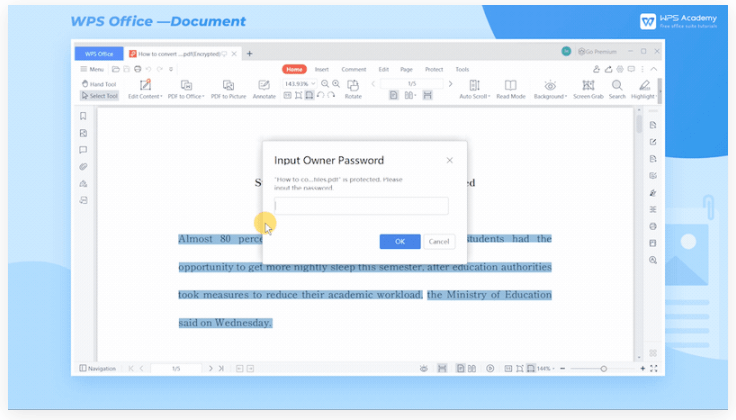
PDFs are a standard in professional document exchange, and WPS provides comprehensive PDF tools that make working with these files straightforward. With WPS PDF tools, users can convert documents to PDF format, merge multiple PDFs into a single file, and even split large PDFs for easier management. Editing features allow users to annotate, highlight, and add text or images directly to PDF files, which eliminates the need for additional software. WPS PDF tools are particularly useful for those who need to review documents or prepare files for professional presentations and reports.
Template Center
Consistency in document design is crucial for professional communication, and the WPS Template Center is a powerful support tool in this regard. It provides a wide range of pre-designed templates for documents, spreadsheets, and presentations. These templates save time and ensure that your work maintains a polished and professional look. Whether you need a business proposal, a financial report, or a visually appealing presentation, the Template Center offers ready-to-use designs that can be customized according to your needs. Using templates reduces the effort required for layout and formatting, allowing you to focus more on content creation.
WPS Spell Check and Grammar Tools
Errors in documents can undermine credibility, so WPS has integrated spell check and grammar tools to help users produce error-free work. These support tools highlight misspelled words, grammatical mistakes, and punctuation errors in real-time. Some versions of WPS also include advanced suggestions for sentence structure improvements. By utilizing these tools, users can ensure that their documents are professional and polished, which is especially important when preparing reports, presentations, or client-facing materials.
WPS Office Add-Ins
WPS also supports a variety of add-ins that extend the functionality of the main office suite. These add-ins can integrate with other productivity applications, provide specialized tools for data analysis, or enhance document formatting capabilities. For instance, certain add-ins allow users to import data from external sources into spreadsheets automatically, perform advanced charting, or access stock images and icons for presentations. Exploring and utilizing WPS add-ins can greatly expand the capabilities of the office suite and save time on complex tasks.
WPS Collaboration Tools
In today’s work environment, collaboration is key. WPS provides built-in support for sharing and co-editing documents with colleagues. Through WPS support tools, users can assign editing permissions, track changes, and leave comments within documents. This functionality ensures smooth teamwork and reduces the confusion that can arise when multiple versions of the same document exist. For remote teams, these collaboration tools are indispensable, allowing members to work together efficiently without the need for constant email exchanges.
WPS Data Recovery and Backup
Accidental deletions or system crashes can result in significant data loss, but WPS includes support tools that help prevent this. The WPS auto-save and backup features create periodic copies of your documents, ensuring that your work is recoverable even in unexpected situations. Additionally, some versions of WPS provide file recovery options that allow users to retrieve unsaved or corrupted files. These tools provide peace of mind and help maintain workflow continuity in case of technical issues.
Mobile WPS Support Tools
For users who are frequently on the move, WPS offers mobile applications with support tools tailored for smaller devices. The mobile apps include cloud access, PDF editing, and real-time collaboration features similar to the desktop version. These tools allow users to edit documents, review spreadsheets, and create presentations from their smartphones or tablets, ensuring productivity is not limited by location. WPS mobile support tools are particularly useful for professionals who travel often or work in multiple locations.
WPS Customer Support and Learning Resources
WPS provides extensive customer support and learning resources, which are also considered support tools. The official WPS website offers tutorials, FAQs, and community forums where users can seek help, learn new techniques, and troubleshoot issues. For more personalized assistance, WPS offers email and chat support. These resources are essential for both new users learning the software and experienced users seeking to optimize their workflows. Leveraging these tools can dramatically reduce the time spent on solving software-related problems.
Conclusion
WPS is more than just an office suite—it’s a comprehensive platform with an array of support tools designed to enhance productivity, collaboration, and document management. From WPS Cloud and PDF tools to templates, spell check, add-ins, and mobile support, each tool plays a crucial role in helping users work smarter and faster. Understanding and utilizing these support tools ensures that whether you are a student, professional, or business team, you can maximize the benefits of WPS. By exploring these features, users can transform routine office tasks into efficient, streamlined processes, making WPS an indispensable part of their digital workspace.